
Automation in Digital Marketing: How to Use Make.com, n8n and Claude AI to Automate Social Media
Meta Description: Learn how to automate digital marketing using Make.com, n8n, and Claude AI. Discover workflows for Instagram, Facebook, LinkedIn, lead generation, content creation, and marketing reports.
Suggested URL Slug: /digital-marketing-automation-make-com-n8n-claude-ai
Introduction
Digital marketing requires consistent content creation, social media management, lead generation, email marketing, and performance tracking. Managing all these activities manually can consume valuable time, especially for small businesses and digital marketing agencies working with multiple clients.
This is where digital marketing automation becomes useful.
With automation platforms such as Make.com and n8n, combined with Claude AI, marketers can build workflows that connect different applications and handle repetitive tasks automatically.
Imagine preparing a social media campaign once, generating captions with Claude AI, saving approved content in Google Sheets, and scheduling posts for Instagram, Facebook, and LinkedIn through a connected publishing tool.
Instead of repeating the same work every day, your agency can focus more on strategy, creativity, and client growth.
In this guide, we will explore how to build a practical digital marketing automation system for your agency.
1. What Is Digital Marketing Automation?
Digital marketing automation uses software and connected workflows to perform repetitive marketing activities with less manual effort.
Examples include:
- Automatically scheduling social media posts.
- Generating captions and content ideas using AI.
- Collecting leads from website forms.
- Sending welcome emails and follow-up messages.
- Updating customer information in a CRM.
- Creating weekly and monthly marketing reports.
- Sending notifications when a new lead arrives.
Automation does not mean removing human involvement from every task. The best systems automate repetitive work while keeping humans involved in creative decisions, fact-checking, and important client communications.
2. Understanding Make.com, n8n and Claude AI
Each tool serves a different purpose in an automated marketing workflow.
Make.com: Visual Workflow Automation
Make.com is a visual automation platform that connects applications through workflows called scenarios. You can build processes by connecting triggers, actions, filters, and data transformations.
For example, when you add a new content idea to Google Sheets, Make.com can send the idea to an AI service, organize the generated caption, and pass the content to a scheduling application.
It is useful for marketers who prefer a visual, low-code approach.
n8n: Flexible Workflow Automation
n8n is a workflow automation platform that offers visual workflows, integrations, API connections, and code options for more advanced processes.
It can connect AI models, databases, spreadsheets, CRMs, websites, and marketing applications. It is particularly useful when you need custom logic, branching workflows, or more control over how data moves between systems.
Depending on your hosting setup and usage, n8n can offer flexibility for agencies building reusable automation systems.
Claude AI: Your AI Content Assistant
Claude AI, developed by Anthropic, can help generate content ideas, draft social media captions, create blog outlines, adapt messages for different platforms, and summarize marketing data.
For example, you can provide a campaign topic and ask Claude to prepare:
- An Instagram caption with relevant hashtags.
- A Facebook post with a clear call to action.
- A LinkedIn post with a professional tone.
- Alternative headlines for testing.
- A short description for a marketing graphic.
Claude Pro provides access to Claude’s paid product features and usage limits. However, Claude Pro does not automatically include API usage for Make.com or n8n. If your workflow calls Claude programmatically, you generally need Anthropic API access and separate API billing, or another supported integration method.
3. Automating Instagram, Facebook and LinkedIn Posting
One of the most useful automations for a digital marketing agency is a system that prepares content and publishes it across multiple social media platforms.
Here is a typical workflow:
Step 1: Create a content idea
Add a topic, campaign name, target audience, image link, and publishing date to a Google Sheet or content database.
Step 2: Generate content using Claude AI
Send the topic and brand guidelines to Claude. Ask it to generate platform-specific captions, hashtags, and calls to action.
Step 3: Review and approve the content
Store the generated drafts in your content calendar. You or your client can approve the captions before publication.
Step 4: Prepare the creative assets
Connect your image or video storage, or use a compatible design-generation workflow. Make sure the final media meets the requirements of each platform.
Step 5: Schedule or publish the content
Use Make.com or n8n to pass the approved content to an appropriate social media publishing integration or supported official API.
Step 6: Record the publishing result
Save the post URL, publication status, platform, and timestamp in your content calendar. Send a notification if a post fails.
Example workflow
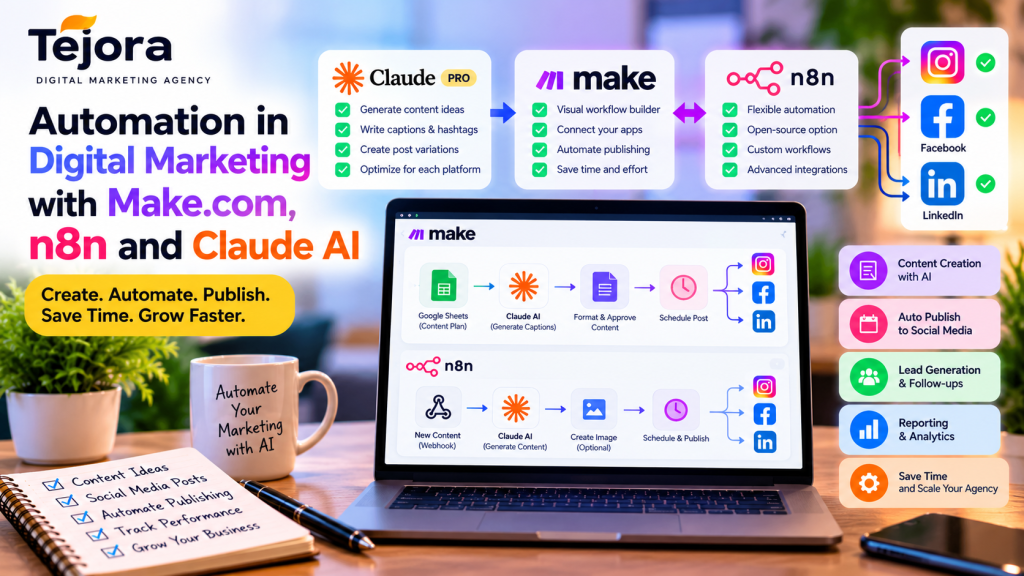
Google Sheets → Make.com or n8n → Claude AI → Content approval → Social media scheduler → Instagram, Facebook and LinkedIn.
This approach helps you manage several channels from one central content calendar.
Important: Direct publishing depends on platform permissions, account type, media format, and the integration you choose. Instagram generally requires an eligible professional account for API publishing. Facebook publishing depends on supported Page permissions and access. LinkedIn publishing depends on the appropriate account, API permissions, and available integrations. Some posts or media types may still require manual action.
4. What Other Digital Marketing Tasks Can You Automate?
Social media publishing is only one part of an agency’s automation strategy.
A. Blog Writing and Content Distribution
You can create a workflow that starts with a blog topic and uses Claude AI to draft an outline, introduction, meta description, and social media promotional posts.
After editorial approval, the workflow can save the draft in your content management system and prepare promotional content for different platforms.
Always review the article for accuracy, originality, search intent, and brand quality before publication.
B. Lead Generation and Follow-Ups
When a visitor submits a website contact form, an automation can:
- Capture the lead’s name, email, and business requirements.
- Add the details to a CRM or Google Sheet.
- Notify your agency by email or another messaging channel.
- Send an appropriate acknowledgement to the prospect.
- Create a follow-up task for your team.
Claude AI can help categorize the enquiry or draft a personalized response, while your workflow handles the transfer of information.
C. Email Marketing
You can connect a lead form to an email marketing platform and trigger a welcome sequence for people who have consented to receive marketing messages.
For example, a new subscriber could receive a welcome email, a useful digital marketing guide, and a later invitation to discuss services.
Make sure your workflow respects consent, unsubscribe requests, and applicable privacy requirements.
D. Marketing Reports and Analytics
An automated reporting workflow can collect available campaign data, organize it in a spreadsheet, and use AI to draft a plain-language summary.
Your report might cover website traffic, leads generated, social engagement, campaign performance, and recommended next steps.
Always verify the figures against the original analytics data before sending a report to clients.
E. Client Onboarding
When a new client signs an agreement or completes an onboarding form, automation can create a client folder, generate a task checklist, request approved brand assets, and notify the relevant team members.
This helps your agency maintain a consistent process for every new project.
5. Make.com vs n8n: Which Should Your Agency Choose?
Both tools can support useful digital marketing workflows, but they suit different working styles.
| Feature | Make.com | n8n |
|---|---|---|
| Workflow building | Visual, no-code/low-code | Visual, with more technical flexibility |
| Getting started | Often easier for beginners | May require more technical learning |
| Custom API workflows | Supported | Strong flexibility for custom workflows |
| Hosting | Managed cloud service | Cloud or self-hosting options |
| Best suited for | Quick marketing integrations | Custom and complex automation systems |
Neither tool is automatically better for every project. Consider the integrations available, execution limits, pricing, maintenance requirements, and the technical skills of your team.
For a beginner agency, Make.com can be a practical starting point. If you later need more customized workflows or greater infrastructure control, you can explore n8n.
6. A Practical Automation System for Tejora
For Tejora, a useful first project is an automated social media content pipeline.
Start with these components:
- Google Sheets: Maintain the content calendar, campaign details, and approval status.
- Claude AI: Generate caption drafts, hashtags, and platform-specific variations.
- Make.com or n8n: Connect the steps and move approved content between applications.
- Canva or another design tool: Prepare branded graphics and marketing creatives.
- A compatible publishing tool: Schedule or publish approved content to supported social media accounts.
- Email or messaging notifications: Report successful posts and publishing errors.
A simple workflow might look like this:
Content topic → Claude-generated captions → Google Sheets → Human approval → Scheduled publication → Status log → Weekly report.
Begin with one platform and a small number of posts. Once the workflow is reliable, expand it to the other channels and client accounts.
For safety, keep API credentials secure, use only the permissions your workflow needs, and add error handling and duplicate-post prevention.
7. How to Get Better Results from Claude AI
The quality of AI-generated content depends heavily on the instructions you provide.
Here is an example prompt you can adapt for your agency:
Prompt:
“You are a digital marketing content specialist working for Tejora, a digital marketing agency serving small businesses. Create three different social media posts about the benefits of local SEO. Write one for Instagram, one for Facebook, and one for LinkedIn. Use a friendly and trustworthy tone. Include a strong opening, useful information, a suitable call to action, and relevant hashtags where appropriate. Keep each post appropriate for its platform. Do not invent statistics, customer testimonials, or unsupported claims. Return the result in a structured format with separate fields for each platform.”
You can then pass the results to your automation workflow for review and approval.
For reliable results, provide your brand guidelines, target audience, service details, campaign objectives, and examples of previous successful content.
8. Benefits of Automation for Digital Marketing Agencies
When implemented carefully, automation can help agencies:
- Reduce repetitive administrative work.
- Maintain a consistent posting schedule.
- Manage multiple clients through repeatable workflows.
- Respond to new leads more quickly.
- Improve the organization of content and campaign data.
- Produce reports more efficiently.
- Spend more time on strategy and client relationships.
Automation still requires setup, testing, monitoring, and maintenance. AI-generated content can contain errors, and integrations can fail because of expired permissions, API limits, or platform changes. Human review and clear error notifications remain essential.
Conclusion
Digital marketing automation is a practical way to make agency operations more efficient. By combining Claude AI for content assistance with Make.com or n8n for workflow orchestration, you can build systems for social media publishing, lead management, email marketing, client onboarding, and performance reporting.
For Tejora, the best starting point is to build a central content calendar, generate platform-specific captions with Claude, review the content, and automate publishing to Instagram, Facebook, and LinkedIn through supported integrations.
Once that workflow works reliably, you can gradually automate other marketing tasks and build a scalable service for your clients.
Ready to make your marketing workflow smarter? Start small, measure the results, and build an automation system that gives your team more time to focus on creative ideas and business growth.
Tejora — Smarter Marketing. Better Automation. Sustainable Growth.
